

Wi-Fi Deauthentication
When your laptop connects to Wi-Fi, there is a lot more happening than choosing a network and entering a password. The client and access point exchange different types of information called frames to establish and maintain the connection.
One of these frames is the deauthentication frame, usually shortened to deauth.
Deauthentication has a legit purpose. An access point or client needs a way to terminate an authenticated connection. The security problem is that older Wi-Fi implementations did not really protect some of these frames, which made it possible to forge them.
That weakness can be used to force devices off a network, trigger a new connection handshake, or repeatedly interrupt wireless service.
What a deauthentication frame does
A simplified Wi-Fi connection looks like this:
Discover Acces Point → Authenticate → Associate → Negotiate security → Connected
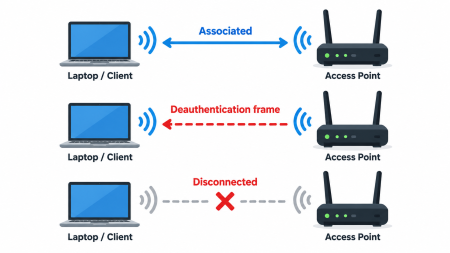
A deauthentication frame tells the receiving device that the authenticated relationship has ended.
A router may legitimately send one when it is restarting, changing configuration, removing a client, or terminating the connection. A client can also terminate its relationship with an access point.
The problem is that older implementations gave clients no strong way to verify that every deauthentication frame actually came from the device it claimed to come from.
How forged deauth frames became useful to attackers
Wi-Fi traffic exposes information needed for normal wireless operation, including addresses identifying the access point and clients.
An attacker within range can observe this traffic. On networks without management-frame protection, that attacker may be able to transmit a deauthentication frame with addressing information that makes it appear to have come from the real access point.
The client receives what appears to be a valid instruction to disconnect and acts on it.
No encryption has been cracked at this point. The attacker did not learn the Wi-Fi password. The weakness is in how the connection itself is managed.
Why deauth is associated with WPA/WPA2 handshake capture
When a WPA/WPA2 client connects, it performs a cryptographic exchange with the access point. This is commonly called the four-way handshake.
Someone monitoring a network may want to capture that exchange. If the client is already connected, there may be nothing useful to capture until it reconnects.
A deauthentication frame can force that reconnect:
Connected → Deauthenticated → Reconnect → Handshake
Someone listening at the same time can record the authentication exchange.
Capturing a handshake does not reveal the Wi-Fi password. It may, however, allow password guesses to be tested offline.
That is why password quality still matters. A short, predictable passphrase is much more vulnerable to guessing than a long, random one.
Deauthentication can also be used for denial of service
An attacker does not have to care about the handshake.
Repeated deauthentication can simply keep a client from staying connected:
Connect → Deauth → Reconnect → Deauth → Reconnect
The user may see dropped video calls, buffering, smart devices going offline, or Wi-Fi that continually disconnects and reconnects.
This makes deauthentication useful as a basic wireless denial-of-service technique on networks and clients that accept forged management frames.
It is also a good example of why strong encryption alone does not secure an entire protocol. WPA may protect the data being transmitted while another part of the connection process still creates an attack surface.
Protected Management Frames
Modern Wi-Fi has a direct defense against forged deauthentication and disassociation frames: Protected Management Frames, or PMF.
PMF comes from IEEE 802.11w and may appear in router settings as:
- Protected Management Frames
- PMF
- 802.11w
- Management Frame Protection
- MFP
Without PMF:
Forged deauth → Client accepts frame → Disconnect
With PMF:
Forged deauth → Validation fails → Client ignores frame
Consumer routers can use PMF too
PMF is not limited to enterprise networking hardware.
Many current consumer routers support it. Depending on the manufacturer, the setting may offer modes such as:
Disabled / Optional / Required
Optional allows compatible devices to use PMF while still permitting older devices that do not support it.
Required means every client must support PMF before it can connect.
Required mode provides better protection, but compatibility can become a problem. Older printers, cameras, smart-home devices, and other IoT hardware may not support it.
PMF does not eliminate every wireless DoS attack
There is an important limitation.
PMF protects specific management frames. It does not prevent someone from interfering with the radio spectrum itself.
Wi-Fi operates over shared spectrum. Radio interference, jamming, protocol abuse, equipment bugs, and other techniques can still cause connectivity problems.
PMF is therefore a defense against forged management-frame attacks, not a universal defense against wireless denial of service.
Why deauthentication is worth understanding
Deauthentication is useful to know because the original feature was not malicious at all.
Wi-Fi needed a way for devices to end an authenticated relationship, so the protocol included one. Researchers later found that those messages could be forged under certain conditions. That weakness became useful for disconnecting clients, forcing reconnections, capturing authentication exchanges, and causing denial of service.
The industry eventually added cryptographic protection through 802.11w and PMF. That protection moved from enterprise equipment into ordinary consumer routers.
Closing thoughts
Deauthentication is a good example of how a legitimate feature can become a security weakness when trust is placed in the wrong place. What started as a normal way for Wi-Fi devices to end a connection became useful for disruption and handshake capture, and protections like PMF were eventually added to fix that gap. It is a small but useful reminder that security is not just about encryption, it is also about how every part of a protocol is designed and trusted.